
Basic
€1.99/ month
incl. VAT · or €19 a year
- Searches
- 2
- Free trial
- 30 days
What you get
- Checked twice a day
- Email alerts with the photo, price and rating
- Every listing we find stays in the app
- Alerts run 30 days at a time, extend in one click
Paste any Airbnb search URL and we watch it for you: new listings the moment they appear, prices when they drop, and places that free up again after someone cancels.
30 days free, cancel any time during the trial
 New · 4 min ago
Cabin with river terrace
€142
Sleeps 6 · ★ 4.92 (128 reviews)

Apartment in the village centre
★ 4.81 (64) · 2 hours ago
€96
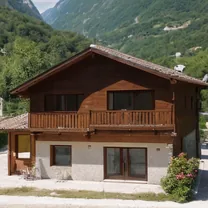
Riverside house, top floor
was €135 · yesterday
€118
Start your search
We keep watching it
Around the clock, in the background.
Possible event
You hear about it
On every plan
Search on Airbnb the way you always do, then paste the URL. Or draw the area yourself, with filters like guests, price and room type built in.
Every new listing arrives with its photo, price and rating, and a direct link straight to the property.
Everything an alert has found stays on its own page, not just in your inbox. Sort by newest or best rated, and filter down to guest favourites.
From Pro and up
See plans and pricesThe difference between finding a place and reading about it after someone else booked it. Premium goes to every 15 minutes.
On your lock screen the moment a listing appears, instead of whenever you next open your inbox.
We keep watching the places we already sent you, and tell you when one gets cheaper.
When a fully booked place frees up again, you hear about it.
Set a floor, and only hear about places above it. Airbnb's own search cannot do this.
Your searches go to the front of the queue on every run, so a busy moment never puts your alert behind someone else's.
Basic starts with 30 days free. Cancel any time; yearly saves about two months.
€1.99/ month
incl. VAT · or €19 a year
What you get
€6.99/ month
incl. VAT · or €69 a year
Everything in Basic, plus
€12.99/ month
incl. VAT · or €129 a year
Everything in Pro, plus
Start with how to get notified of new Airbnb listings, which covers every method including Airbnb's own. If you are waiting on a place that is already booked, see Airbnb cancellation alerts. And if you want alerts on your lock screen rather than in your inbox, see Airbnb push notifications.
Airbnb has no alert for new listings. Alertbnb fills that gap: paste an Airbnb search URL, or pick the area on a map, and we email you as soon as a new place appears in that search.
We run your saved search on a schedule: every 15 minutes on Premium, every 30 on Pro, twice a day on Basic. When a new listing matches your filters, you get an email with the details and a direct link.
Yes. Set your filters on Airbnb (location, price, guests, property type) and paste the URL into Alertbnb. You can also skip the URL and pick the area on a map, with the same filters. Either way you hear it when a new match appears.
Yes. When a search matches more than 200 listings, we ask you to narrow it before we can watch it well. At that size Airbnb's own order for the results shifts between checks, so the same places would keep showing up as new and flood your inbox instead of telling you anything useful. Pick a smaller neighbourhood, or add filters like price, property type, or number of guests to bring the count down, and try again.
You do not need one. When you create an alert, choose "Choose on a map": search for a place or move the map to the area you want, set your filters, and we build the Airbnb search for you. That is the easiest route on a phone, because a search made inside the Airbnb app cannot be copied. Would you rather paste a URL? Open a private tab in Safari or Chrome, type airbnb.com yourself so the app does not take over, and copy the URL from the address bar.
Premium checks every 15 minutes, Pro every 30, Basic twice a day. A new listing goes out the moment we see it, and Premium and Pro searches run first.
Yes. Basic covers 2 searches, Pro 3 and Premium 5, so you can watch different places, dates or price ranges at the same time.
Yes, on Pro and Premium. Turn on price drop alerts per search and pick how big a drop counts: 1, 5 or 10 percent. You then get an email with the old and the new price when a listing we sent you falls by at least that much, measured against its price when we first sent it to you.
Yes, on Pro and Premium. We remember the places we sent you, and when one disappears from your search and later comes back it is almost always a cancellation. You get an email saying it is bookable again.
Yes, on Pro and Premium. Set a minimum rating and a minimum number of reviews per search, and only listings above that reach you. Airbnb itself has no rating filter. Listings without a rating still come through, because a new place has nothing to judge yet.
Push is on Pro and Premium. First put Alertbnb on your device: on iPhone open the site in Safari, tap Share and choose "Add to Home Screen". On Android tap the browser menu and choose "Install app". Then turn on push in your notification settings.
One pasted URL, and the next new listing in it reaches you before it reaches the people refreshing by hand.